Recoil은 React를 위한 상태 관리 라이브러리다.
설치
yarn을 사용한다면 아래의 명령어를 사용하여 설치한다.
yarn add recoil
RecoilRoot
recoil 상태를 사용하는 컴포넌트는 부모 트리 어딘가에 나타나는 RecoilRoot가 필요하다.
루트 컴포넌트가 RecoilRoot를 넣기 좋은 장소이다.
import React from 'react';
import {
  RecoilRoot,
  atom,
  selector,
  useRecoilState,
  useRecoilValue,
} from 'recoil';

function App() {
  return (
    <RecoilRoot>
      <CharacterCounter />
    </RecoilRoot>
  );
}
다음 부분에서 CharacterCounter 컴포넌트를 구현할 것이다.
Atom
Atom은 상태의 일부를 나타낸다. Atoms는 어떤 컴포넌트에서나 읽고 쓸 수 있다. atom의 값을 읽는 컴포넌트들은 암묵적으로 atom을 구독한다. 그래서 atom에 어떤 변화가 있으면 atom을 구독하는 모든 컴포넌트들이 재랜더링 되는 결과가 발생할 것이다.
const textState = atom({
  key: 'textState', // unique ID (with respect to other atoms/selectors)
  default: '', // default value (aka initial value)
});
컴포넌트가 atom을 읽고 쓰게 하기 위해서는 useRecoilState()를 아래와 같이 사용하면 된다.
function CharacterCounter() {
  return (
    <div>
      <TextInput />
      <CharacterCount />
    </div>
  );
}

function TextInput() {
  const [text, setText] = useRecoilState(textState);

  const onChange = (event) => {
    setText(event.target.value);
  };

  return (
    <div>
      <input type="text" value={text} onChange={onChange} />
      <br />
      Echo: {text}
    </div>
  );
}
Selector
Selector는 파생된 상태의 일부를 나타낸다. 파생된 상태는 상태의 변화이다. 파생된 상태를 어떤 방법으로든 주어진 상태를 수정하는 순수 함수에 전달된 상태의 결과물로 생각할 수 있다.
const charCountState = selector({
  key: 'charCountState', // unique ID (with respect to other atoms/selectors)
  get: ({get}) => {
    const text = get(textState);

    return text.length;
  },
});
우리는 useRecoilValue() 훅을 사용해서 charCountState 값을 읽을 수 있다.
function CharacterCount() {
  const count = useRecoilValue(charCountState);

  return <>Character Count: {count}</>;
}
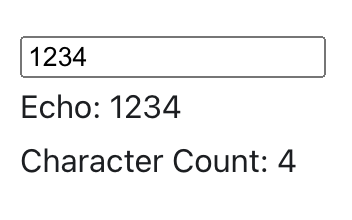
아래는 완성된 결과물이다
'Dev > Front-End' 카테고리의 다른 글
| [react-query] react-query 사용이유, 장점 (0) | 2022.05.17 |
|---|---|
| [Recoil] Recoil의 동기 및 주요개념 (0) | 2022.01.30 |
| [JavaScript] JavaScript 기초 (2) (0) | 2022.01.14 |
| [JavaScript] JavaScript 기초 (1) (0) | 2022.01.14 |